Showing posts with label Spring boot. Show all posts

Wednesday, April 27, 2022

No 'Access-Control-Allow-Origin' header is present on the requested resource.

To fix this error,  I used to enable spring security I have added below class in my spring boot application.

Here my API is running in 8080 and angular in 4200

@Configuration
@EnableWebSecurity
public class SpringSecurityConfig extends WebSecurityConfigurerAdapter {

@Override
protected void configure(HttpSecurity http) throws Exception {
http.cors().and().authorizeRequests().
antMatchers( "/**")
.permitAll()
.anyRequest()
.authenticated();
}
}
And my controller is like
@RestController
public class AuthenticationController {

@RequestMapping(method = RequestMethod.GET, value = "/login")
public String userValidation(){
return "valid user";
}
    @GetMapping(path = "/basicauth")
    public AuthenticationBean basicauth() {
     return new AuthenticationBean("You are authenticated");
    }

}
After this I got below error, 

Access to XMLHttpRequest at 'http://localhost:8080/basicauth' from origin 'http://localhost:4200' has been blocked by CORS policy: No 'Access-Control-Allow-Origin' header is present on the requested resource.

GET http://localhost:8080/basicauth net::ERR_FAILED 401

HttpErrorResponse {headers: HttpHeaders, status: 0, statusText: 'Unknown Error', url: 'http://localhost:8080/basicauth', ok: false, …}

  1. message"Http failure response for http://localhost:8080/basicauth: 0 Unknown Error"
  2. name"HttpErrorResponse"
  3. okfalse
  4. status0
  5. statusText"Unknown Error"
  6. url"http://localhost:8080/basicauth"
Resolve this error I added below code in my controller class.
@CrossOrigin(origins = "http://localhost:4200")
@RestController
public class AuthenticationController {
//your methods are here...!
}
After this change the same call give response like below,


Thank you!

Monday, April 25, 2022

Http failure response for http://localhost:8080/alluser: 0 Unknown Error","error":{"isTrusted":true}

For a mini project I used spring boot as API and angular as UI.  In Spring boot I have added spring-boot-starter-security for secured my application. And I added my implementation for add/update/view data. After that I started working with Angular front end with mock data. 

Then I started integration part of UI with API. The first call I made from UI to API to fetch the uses available in DB and display them in list. While calling from UI, backend did not allow the UI request, because we have security check in API. In API I added security username and password. 

spring.security.user.name=user
spring.security.user.password=user

So we need to added security config to resolve this issue. I will post the solution
in next post.


Here is full error stack trace:
 main.js:1 ERROR Error: Uncaught (in promise): s1: {"headers":{"normalizedNames":{},"lazyUpdate":null,"headers":{}},"status":0,"statusText":"Unknown Error","url":"http://localhost:8080/alluser","ok":false,"name":"HttpErrorResponse","message":"Http failure response for http://localhost:8080/alluser: 0 Unknown Error","error":{"isTrusted":true}}
    at _e (polyfills.js:1:160289)
    at _e (polyfills.js:1:159769)
    at polyfills.js:1:161152
    at X.invokeTask (polyfills.js:1:154522)
    at Object.onInvokeTask (main.js:1:255253)
    at X.invokeTask (polyfills.js:1:154442)
    at X.runTask (polyfills.js:1:149526)
    at te (polyfills.js:1:156890)
    at X.invokeTask [as invoke] (polyfills.js:1:155703)
    at ee (polyfills.js:1:169257)

Thank you.

the request doesn't contain a multipart/form-data or multipart/mixed stream, content type header is application/json

Hi,

Today I created mini project using spring boot and angular to maintain user data. While adding the user from angular I got below error. 

org.apache.tomcat.util.http.fileupload.impl.InvalidContentTypeException: the request doesn't contain a multipart/form-data or multipart/mixed stream, content type header is application/json
at org.apache.tomcat.util.http.fileupload.impl.FileItemIteratorImpl.init(FileItemIteratorImpl.java:151) ~[tomcat-embed-core-9.0.60.jar:9.0.60]
at 

And code is like this.

@RequestMapping(value="adduser", method = RequestMethod.POST)
@ResponseBody
public User createNewUser(@RequestPart User user){
user.setCreatedDate(LocalDateTime.now());
return userService.createNewUser(user);
}

<form [formGroup]="userForm"  (ngSubmit)="onUserDetail()">
<div class="container">
Username: <input class="input_filed" type="text" name="username" formControlName="username">
Email: <input class="input_filed" type="text" name="email" formControlName="email">
Title: <input class="input_filed" type="text" name="title" formControlName="title">
<button >Add</button>
</div>
</form>
So clearly it says the format of input param of createNewUse() method was not expected.
I tried to add the @RequestPart("user") also I end up with same error.

Then I used @RequestBody instead of @RequestPart. This works for me I am able to send the
user data from UI to backend.

Working code:


@RequestMapping(value="adduser", method = RequestMethod.POST)
@ResponseBody
public User createNewUser(@RequestBody User user){
user.setCreatedDate(LocalDateTime.now());
return userService.createNewUser(user);
}

Thanks all. Full error stack trace is below.


org.apache.tomcat.util.http.fileupload.impl.InvalidContentTypeException: the request doesn't contain a multipart/form-data or multipart/mixed stream, content type header is application/json
at org.apache.tomcat.util.http.fileupload.impl.FileItemIteratorImpl.init(FileItemIteratorImpl.java:151) ~[tomcat-embed-core-9.0.60.jar:9.0.60]
at 
 org.apache.tomcat.util.http.fileupload.impl.InvalidContentTypeException: the request doesn't contain a multipart/form-data or multipart/mixed stream, content type header is application/json
at org.apache.tomcat.util.http.fileupload.impl.FileItemIteratorImpl.init(FileItemIteratorImpl.java:151) ~[tomcat-embed-core-9.0.60.jar:9.0.60]
at org.apache.tomcat.util.http.fileupload.impl.FileItemIteratorImpl.getMultiPartStream(FileItemIteratorImpl.java:205) ~[tomcat-embed-core-9.0.60.jar:9.0.60]
at org.apache.tomcat.util.http.fileupload.impl.FileItemIteratorImpl.findNextItem(FileItemIteratorImpl.java:224) ~[tomcat-embed-core-9.0.60.jar:9.0.60]
at org.apache.tomcat.util.http.fileupload.impl.FileItemIteratorImpl.<init>(FileItemIteratorImpl.java:142) ~[tomcat-embed-core-9.0.60.jar:9.0.60]
at org.apache.tomcat.util.http.fileupload.FileUploadBase.getItemIterator(FileUploadBase.java:252) ~[tomcat-embed-core-9.0.60.jar:9.0.60]
at org.apache.tomcat.util.http.fileupload.FileUploadBase.parseRequest(FileUploadBase.java:276) ~[tomcat-embed-core-9.0.60.jar:9.0.60]
at org.apache.catalina.connector.Request.parseParts(Request.java:2932) ~[tomcat-embed-core-9.0.60.jar:9.0.60]
at org.apache.catalina.connector.Request.getParts(Request.java:2834) ~[tomcat-embed-core-9.0.60.jar:9.0.60]
at org.apache.catalina.connector.RequestFacade.getParts(RequestFacade.java:1098) ~[tomcat-embed-core-9.0.60.jar:9.0.60]
at org.springframework.web.multipart.support.StandardMultipartHttpServletRequest.parseRequest(StandardMultipartHttpServletRequest.java:95) ~[spring-web-5.3.18.jar:5.3.18]
at org.springframework.web.multipart.support.StandardMultipartHttpServletRequest.<init>(StandardMultipartHttpServletRequest.java:88) ~[spring-web-5.3.18.jar:5.3.18]
at org.springframework.web.multipart.support.StandardMultipartHttpServletRequest.<init>(StandardMultipartHttpServletRequest.java:72) ~[spring-web-5.3.18.jar:5.3.18]
at org.springframework.web.multipart.support.MultipartResolutionDelegate.asMultipartHttpServletRequest(MultipartResolutionDelegate.java:82) ~[spring-web-5.3.18.jar:5.3.18]
at org.springframework.web.multipart.support.RequestPartServletServerHttpRequest.<init>(RequestPartServletServerHttpRequest.java:68) ~[spring-web-5.3.18.jar:5.3.18]
at org.springframework.web.servlet.mvc.method.annotation.RequestPartMethodArgumentResolver.resolveArgument(RequestPartMethodArgumentResolver.java:139) ~[spring-webmvc-5.3.18.jar:5.3.18]
at org.springframework.web.method.support.HandlerMethodArgumentResolverComposite.resolveArgument(HandlerMethodArgumentResolverComposite.java:122) ~[spring-web-5.3.18.jar:5.3.18]
at org.springframework.web.method.support.InvocableHandlerMethod.getMethodArgumentValues(InvocableHandlerMethod.java:179) ~[spring-web-5.3.18.jar:5.3.18]
at org.springframework.web.method.support.InvocableHandlerMethod.invokeForRequest(InvocableHandlerMethod.java:146) ~[spring-web-5.3.18.jar:5.3.18]
at org.springframework.web.servlet.mvc.method.annotation.ServletInvocableHandlerMethod.invokeAndHandle(ServletInvocableHandlerMethod.java:117) ~[spring-webmvc-5.3.18.jar:5.3.18]
at org.springframework.web.servlet.mvc.method.annotation.RequestMappingHandlerAdapter.invokeHandlerMethod(RequestMappingHandlerAdapter.java:895) ~[spring-webmvc-5.3.18.jar:5.3.18]
at org.springframework.web.servlet.mvc.method.annotation.RequestMappingHandlerAdapter.handleInternal(RequestMappingHandlerAdapter.java:808) ~[spring-webmvc-5.3.18.jar:5.3.18]
at org.springframework.web.servlet.mvc.method.AbstractHandlerMethodAdapter.handle(AbstractHandlerMethodAdapter.java:87) ~[spring-webmvc-5.3.18.jar:5.3.18]
at org.springframework.web.servlet.DispatcherServlet.doDispatch(DispatcherServlet.java:1067) ~[spring-webmvc-5.3.18.jar:5.3.18]
at org.springframework.web.servlet.DispatcherServlet.doService(DispatcherServlet.java:963) ~[spring-webmvc-5.3.18.jar:5.3.18]
at org.springframework.web.servlet.FrameworkServlet.processRequest(FrameworkServlet.java:1006) ~[spring-webmvc-5.3.18.jar:5.3.18]
at org.springframework.web.servlet.FrameworkServlet.doPost(FrameworkServlet.java:909) ~[spring-webmvc-5.3.18.jar:5.3.18]
at javax.servlet.http.HttpServlet.service(HttpServlet.java:681) ~[tomcat-embed-core-9.0.60.jar:4.0.FR]
at org.springframework.web.servlet.FrameworkServlet.service(FrameworkServlet.java:883) ~[spring-webmvc-5.3.18.jar:5.3.18]
at javax.servlet.http.HttpServlet.service(HttpServlet.java:764) ~[tomcat-embed-core-9.0.60.jar:4.0.FR]
at org.apache.catalina.core.ApplicationFilterChain.internalDoFilter(ApplicationFilterChain.java:227) ~[tomcat-embed-core-9.0.60.jar:9.0.60]
at org.apache.catalina.core.ApplicationFilterChain.doFilter(ApplicationFilterChain.java:162) ~[tomcat-embed-core-9.0.60.jar:9.0.60]
at org.apache.tomcat.websocket.server.WsFilter.doFilter(WsFilter.java:53) ~[tomcat-embed-websocket-9.0.60.jar:9.0.60]
at org.apache.catalina.core.ApplicationFilterChain.internalDoFilter(ApplicationFilterChain.java:189) ~[tomcat-embed-core-9.0.60.jar:9.0.60]
at org.apache.catalina.core.ApplicationFilterChain.doFilter(ApplicationFilterChain.java:162) ~[tomcat-embed-core-9.0.60.jar:9.0.60]
at org.springframework.web.filter.RequestContextFilter.doFilterInternal(RequestContextFilter.java:100) ~[spring-web-5.3.18.jar:5.3.18]
at org.springframework.web.filter.OncePerRequestFilter.doFilter(OncePerRequestFilter.java:117) ~[spring-web-5.3.18.jar:5.3.18]
at org.apache.catalina.core.ApplicationFilterChain.internalDoFilter(ApplicationFilterChain.java:189) ~[tomcat-embed-core-9.0.60.jar:9.0.60]
at org.apache.catalina.core.ApplicationFilterChain.doFilter(ApplicationFilterChain.java:162) ~[tomcat-embed-core-9.0.60.jar:9.0.60]
at org.springframework.web.filter.FormContentFilter.doFilterInternal(FormContentFilter.java:93) ~[spring-web-5.3.18.jar:5.3.18]
at org.springframework.web.filter.OncePerRequestFilter.doFilter(OncePerRequestFilter.java:117) ~[spring-web-5.3.18.jar:5.3.18]
at org.apache.catalina.core.ApplicationFilterChain.internalDoFilter(ApplicationFilterChain.java:189) ~[tomcat-embed-core-9.0.60.jar:9.0.60]
at org.apache.catalina.core.ApplicationFilterChain.doFilter(ApplicationFilterChain.java:162) ~[tomcat-embed-core-9.0.60.jar:9.0.60]
at org.springframework.web.filter.CharacterEncodingFilter.doFilterInternal(CharacterEncodingFilter.java:201) ~[spring-web-5.3.18.jar:5.3.18]
at org.springframework.web.filter.OncePerRequestFilter.doFilter(OncePerRequestFilter.java:117) ~[spring-web-5.3.18.jar:5.3.18]
at org.apache.catalina.core.ApplicationFilterChain.internalDoFilter(ApplicationFilterChain.java:189) ~[tomcat-embed-core-9.0.60.jar:9.0.60]
at org.apache.catalina.core.ApplicationFilterChain.doFilter(ApplicationFilterChain.java:162) ~[tomcat-embed-core-9.0.60.jar:9.0.60]
at org.apache.catalina.core.StandardWrapperValve.invoke(StandardWrapperValve.java:197) ~[tomcat-embed-core-9.0.60.jar:9.0.60]
at org.apache.catalina.core.StandardContextValve.invoke(StandardContextValve.java:97) [tomcat-embed-core-9.0.60.jar:9.0.60]
at org.apache.catalina.authenticator.AuthenticatorBase.invoke(AuthenticatorBase.java:541) [tomcat-embed-core-9.0.60.jar:9.0.60]
at org.apache.catalina.core.StandardHostValve.invoke(StandardHostValve.java:135) [tomcat-embed-core-9.0.60.jar:9.0.60]
at org.apache.catalina.valves.ErrorReportValve.invoke(ErrorReportValve.java:92) [tomcat-embed-core-9.0.60.jar:9.0.60]
at org.apache.catalina.core.StandardEngineValve.invoke(StandardEngineValve.java:78) [tomcat-embed-core-9.0.60.jar:9.0.60]
at org.apache.catalina.connector.CoyoteAdapter.service(CoyoteAdapter.java:360) [tomcat-embed-core-9.0.60.jar:9.0.60]
at org.apache.coyote.http11.Http11Processor.service(Http11Processor.java:399) [tomcat-embed-core-9.0.60.jar:9.0.60]
at org.apache.coyote.AbstractProcessorLight.process(AbstractProcessorLight.java:65) [tomcat-embed-core-9.0.60.jar:9.0.60]
at org.apache.coyote.AbstractProtocol$ConnectionHandler.process(AbstractProtocol.java:889) [tomcat-embed-core-9.0.60.jar:9.0.60]
at org.apache.tomcat.util.net.NioEndpoint$SocketProcessor.doRun(NioEndpoint.java:1743) [tomcat-embed-core-9.0.60.jar:9.0.60]
at org.apache.tomcat.util.net.SocketProcessorBase.run(SocketProcessorBase.java:49) [tomcat-embed-core-9.0.60.jar:9.0.60]
at org.apache.tomcat.util.threads.ThreadPoolExecutor.runWorker(ThreadPoolExecutor.java:1191) [tomcat-embed-core-9.0.60.jar:9.0.60]
at org.apache.tomcat.util.threads.ThreadPoolExecutor$Worker.run(ThreadPoolExecutor.java:659) [tomcat-embed-core-9.0.60.jar:9.0.60]
at org.apache.tomcat.util.threads.TaskThread$WrappingRunnable.run(TaskThread.java:61) [tomcat-embed-core-9.0.60.jar:9.0.60]
at java.lang.Thread.run(Thread.java:748) [na:1.8.0_231]


Tuesday, April 19, 2022

java.lang.IllegalArgumentException: Not a managed type: class com.example.demo.entity.Customer

I tried to add couple of new entity classes in my project, service implementation and repository for those entity. Once after all done I tried to run my application, my IDE show up to below exception to me.


"org.springframework.beans.factory.BeanCreationException: Error creating bean with name 'customerRepo' defined in com.example.demo.repo.CustomerRepo defined in @EnableJpaRepositories declared on DemoApplication: Invocation of init method failed; nested exception is java.lang.IllegalArgumentException: Not a managed type: class com.example.demo.entity.Customer"

Here my Repo and Customer class

public interface CustomerRepo extends JpaRepository<Customer, Integer> {
}
public class Customer {
private Integer id;
private String name;
private String mobile;
private String email;
}

Its clearly says Customer class is not able to manage by JpaRepository. So JPA not able to consider this Customer class as entity. Because I used Customer class in Repo class as JpaRepository. 

Here the mistake is I forget to change the POJO to Entity. I missed to annotate Customer class with @Entity.


@Entity
@Table(name= "customer", schema = "public")
public class Customer {

So we need to add @Entity annotation to tell jpa this is a entity class to resolve 
this error.

This solve the above exception.

Failed to configure a DataSource: 'url' attribute is not specified and no embedded datasource could be configured

 I have faced "

Failed to configure a DataSource: 'url' attribute is not specified and no embedded datasource could be configured" error while setting up my learning project using spring boot with postgres.


After spending an hour on searching to fix this issue I have found the solution for it.

Adding below in application.properties resolve this issue for me.

spring.autoconfigure.exclude=org.springframework.boot.autoconfigure.jdbc.DataSourceAutoConfiguration

Tuesday, February 22, 2022

SecurityContext and SecurityContextHolder in Spring Security.

Main purpose of SecurityContext to hold the currently authenticated user information as
principal and make sure this principal will be available all the method in same thread.
To get authenticated user details SecurityContextHolder will be used.


from principle? Here my spring boot project structure. From this principal we can get the currently logged in user. How can we get the user detail.


I have added spring-boot-starter-security jar in my pom.xml. This to set a default login screen for my application. 

<dependency>
<groupId>org.springframework.boot</groupId>
<artifactId>spring-boot-starter-security</artifactId>
</dependency>
If you add this dependency, spring boot will generate the password for your application on
server startup.

You can see the password in console log: Here generated security is below and default username will be 'user',
Using generated security password: e3660fc9-941c-4012-ba6d-8d1870a177d6. If you restart the server then new password will be generate.

Let we check the principal for default user and password for security context.


Here we are able to get the username of currently logged in user using securitycontext and securitycontextholder. 

We cannot every time copy the password from console. Spring provide the properties to set username and password. Here I used them for my application security. Let we check principal after change this property change.

spring.security.user.name=username
spring.security.user.password=User@123

Let login the application using new username and password, check the securityContext 
userdetails,


Let check with other method call and find the username for securitycontext.
let me call my getUser() to fetch particular user detail from db,

let me call : http://localhost:8084/getUser?userId=101

Here we can see the username from securityContext. Usually we need to have
securityContextHolder to get securityContext, from securityContext we can get authentication
from there we can get principal.

Here code snippet:

Object principalObject = SecurityContextHolder.getContext().
                                    getAuthentication().getPrincipal();

if(principalObject instanceof org.springframework.security.core.userdetails.User)
{
String userName = ((org.springframework.security.core.userdetails.User)principalObject)
                                                                               .getUsername();
System.out.println("logged in user: " + userName);
}

Main purpose of SecurityContext to hold the currently authenticated user information as
principal and make sure this principal will be available all the method in same thread.
To get authenticated user details SecurityContextHolder will be used.


From this principal we can get the currently logged in user. How can we get the user detail
from principle? Here my spring boot project structure.

Friday, January 28, 2022

Error creating bean with name 'conversionServicePostProcessor' defined in class path resource

Today I changed my .m2 repository from external repo to internal repo. After downloading all the necessary jars, I did mvn clean install and both got success. Then i tried to start my inbuild tomcat server for my spring boot application, after few seconds I got this error on console and server shutdown.


Error creating bean with name 'conversionServicePostProcessor' defined in class path resource [org/springframework/security/config/annotation/web/configuration/WebSecurityConfiguration.class]: Bean instantiation via factory method failed; nested exception is org.springframework.beans.BeanInstantiationException: Failed to instantiate [org.springframework.beans.factory.config.BeanFactoryPostProcessor]: Factory method 'conversionServicePostProcessor' threw exception; nested


The same code working other for my team, so I just googled the error and find some suggestion,   

spring.main.allow-bean-definition-overriding=true

But this same already available in my application.properties.


spring.main.allow-bean-definition-overriding=true 
So I have no clue to solve this issue, I tried many suggestion nothing works for me. Then I remember one, what if I try to  
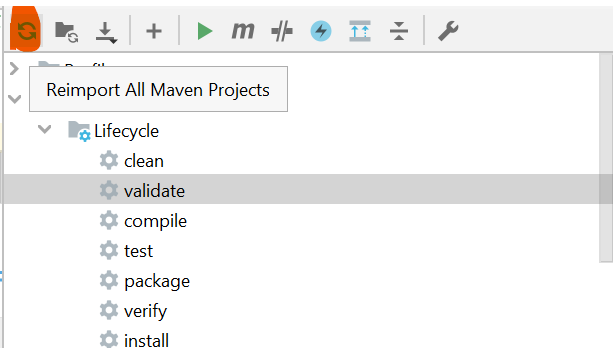
Reimport All Maven Projects in my IDE, I am using IntelliJ. If you are using Eclipse just refresh the dependencies.


After all the jar loading done, I retried to start the server. Finally it works for me.
If you have some problem initializing spring boot bean after successful mvn install, just try reimport your jars on your IDE.
Because sometime your IDE need manual call to get refresh the dependencies.


Thursday, January 27, 2022

Spring Boot Actuator

 In Spring Boot, Actuator allows you to monitor your application, by just adding a dependency in you pom.xml. By adding this dependency we can able to track health check of the application. This will help on production environment, to check the application is running or not?. 

Let see how to implement this,

Create a spring boot application using Spring initializr . To test actuator we need to select spring-boot-starter-actuator along with spring-boot-starter-web(without this we cannot start the server).

Here my project specification, Using java 8, Maven Project .


Finally we can download the project. And the downloaded project in your IDE.

To Start application we need to do mvn clean install. Once that done we are good to start the server.

While starting the server we will see following log that confirm that we are enabling the actuator.


Here are three default actuator to check and monitor the application.(health, info and actuator). Here my server started on port 8081. Let me hit my server using http://localhost:8081/actuator. See the below JSON format available monitoring methods. Remember we need to call get method not post.


Is there only 3method to check the monitor, No. Then where are others??. Do we need to add any code to get all of them?? . Yes we need to mention in application.properties to say expose all the monitoring methods.

Add below code in your application.properties to expose all the monitoring method.

management.endpoints.web.exposure.include=*

Here let check server log after exposing all the monitoring methods,


We can see 14 endpoints exposed. Here output is like below,
I captured part of the output.


This will enable expose all the method available in spring boot monitoring.
Or we can add specific property by using below,

management.endpoint.health.enabled=true
management.endpoint.loggers.enabled=true

And let see what we can see by calling endpoint actuator/health


by calling http://localhost:8081/actuator/beans we can see what are the bean
initialized on server start of the this application.